Authoring a snodo plan
A contract for whatever writes plans — a human, or an orchestrator model asked to break a specification into executable work. It describes exactly what snodo accepts, what it refuses, and why.
snodo does not generate plans. snodo plan create writes an empty scaffold;
everything below is authored.
1. The one modelling rule
Dependencies are between waves, not between tasks.
Group work into plans. A plan is one clear intention. Waves group its tasks: tasks in a wave run in parallel, and waves run in series. Queues group and schedule plans. Dispatch a single task only for a true one-off with no related work. A plan with one task in one wave adds nothing.
Every task in a wave may run in any order, and a wave is only entered once every wave it depends on has completely finished. There is no way to say "task 2.2 needs task 2.1". If B needs A's output, B goes in a later wave.
So the question for each task is not "what does this depend on?" but "what must already be true in the repository before this task starts?" Everything sharing an answer belongs in the same wave.
A wave is a barrier, not a bucket. Two tasks that both edit the same function belong in different waves even if neither logically depends on the other, because they will otherwise both start from the same base and the second will be reviewed against a tree that does not contain the first.
Ordering is expressed only by waves: when one task needs another's output, put it in a later wave. Tasks that touch the same code also belong in separate waves, even if neither depends on the other, to avoid overlapping work.
By default, put several small, independently useful tasks in each wave. Add waves only when ordering or overlapping code demands it.
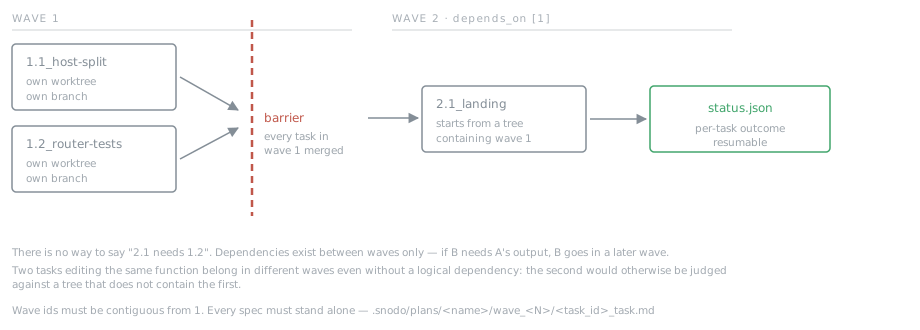
2. Layout
.snodo/plans/<plan-name>/
  plan.yml
  status.json
  wave_1/
    1.1_host-split_task.md
    1.2_router-tests_task.md
  wave_2/
    2.1_landing_task.md
Directory is wave_<N> where N is the wave id. Spec file is
<task_id>_task.md — the task id verbatim, then _task.md.
plan.yml
name: w2
intent: >
  Split the app onto its own host and put marketing on the freed www root.
waves:
  - id: 1
    depends_on: []
    tasks:
      - "1.1_host-split"
      - "1.2_router-tests"
  - id: 2
    depends_on: [1]
    tasks:
      - "2.1_landing"
name— matches the directory name.intent— one or two sentences. What the whole plan is for. Not a summary of the tasks.waves[].id— an integer. Wave ids must be contiguous from 1:1, 2, 3. A plan with waves1, 3is refused.waves[].depends_on— integer wave ids that must be complete first. May be empty. May not name a wave that does not exist, and may not form a cycle.waves[].tasks— task ids, as strings.
status.json
{ "tasks": {} }
That is the whole file for a new plan. snodo fills it in as tasks run, giving
each an entry of {status, parent_task_ref, depth, spec_hash} where status is
one of pending, in_progress, completed, blocked, errored. A blocked
task has a task-level failure and is retried with that failure as context. An
errored task means the runner hit an operational or internal fault instead of
receiving a task result; it is not retried, because passing that fault to a
faultless coder as critique could cause a sound specification to be rewritten
to chase a problem it did not cause. Do not pre-populate it — an entry naming a
task that no wave lists is an error.
Task ids
Must match ^\d+\.\d+_[A-Za-z0-9_-]+$ — wave number, dot, sequence number,
underscore, a name of letters, digits, hyphens and underscores.
1.1_host-split      ok
2.1_landing         ok
1.1_host split      no — space
1_host-split        no — no sequence number
w1.1_host-split     no — wave must be a bare integer
The leading number must equal the wave the task is listed in. 2.1_landing
in wave 1 puts its spec file in the wrong directory and the plan will not
validate.
3. What goes in a task spec
Each *_task.md is the complete instruction for one run of the protocol loop.
It is read verbatim as the task specification — the same string you would pass
to snodo run "...". Nothing else is injected. The task cannot see the plan,
the other tasks, or the intent.
Write every spec as if it is the only thing the reader will ever see. If wave 2 depends on wave 1, wave 2's spec must describe the state of the repository after wave 1, in its own words. Never write "as established in task 1.1".
When a task is confined to one declared module, name it with module on
generate_spec or --module on snodo plan add-task. The module selects its
own quality test command and bounds the task's writable paths. Leave the module
unset when the task spans modules; scope is explicit and is never inferred from
the paths mentioned in the spec.
The structure that works, in this order:
INTENT — what becomes true, in the product's terms. Name the files and functions involved, and say what is already correct so the reader does not re-do it. Point at the authoritative records (ADRs, design files) by path, and state that where the spec and the record disagree, the record wins.
THE CHAIN — the numbered links of states that must all be true for the task
to be done. Each link names a file and the state that must be true in it when
the task is done; describe the outcome, not the code to write. For example,
src/cart/total.ts — an empty cart reports a total of zero is a good link.
“Return 0 when items.length is 0” prescribes the solution. Name every file
the task will change so possible same-wave file overlap can be detected at plan
time. The last link is usually a test.
CONSTRAINTS — what must not change, and the invariants that survive. Say the reason, not just the rule; a reviewer that knows why can catch a violation you did not anticipate. Explicitly list files that are out of scope.
ACCEPTANCE — the specific tests that must exist and pass. Concrete enough that their absence is unambiguous.
Do not put a mode on a task. Modes are a protocol concept; the plan does not choose them. A plan runs under one protocol, and the mode is whatever the protocol's current mode is. If two tasks genuinely need different modes, they are two plans.
4. What gets the plan refused
Choose the structure before authoring
Follow the canonical rule above: group work into plans, and dispatch a single task only for a true one-off with no related work. Sending related work as a string of single tasks, or putting one task in each wave, adds unnecessary wrappers and barriers.
A plan adds durable plan→wave→task history, but does not change task validation or merge policy.
There is no additional human authorization gate in validate_plan: it checks
plan structure and spec references before a plan run, while validate_task
runs the execution validators for each task. Direct tasks and plan tasks use
the same execution loop and auto-merge policy. A plan does add durable
plan→wave→task history that the cloud can reconstruct (ADR 054); direct task
history does not carry that plan hierarchy. If that reporting hierarchy is a
deliberate requirement for a single-wave task, treat it as an explicit exception
to the sizing rule rather than assuming a plan changes task validation or
merging.
The CLI command snodo plan validate <name> and the MCP tool
validate_plan run before wave 1 dispatches anything, so a malformed plan
fails before any work happens rather than in the middle.
Errors — the plan will not run:
| message | cause |
|---|---|
Missing intent |
intent absent or empty |
No waves defined |
waves empty |
Plan has no tasks in any wave |
every wave has an empty tasks list |
Wave-number gap detected: expected contiguous 1..N |
wave ids are not 1..N |
Wave id '<v>' is not an integer |
a non-integer wave id |
Wave N depends on unknown wave M |
depends_on names a wave that does not exist |
Wave dependency cycle detected involving wave N |
waves depend on each other in a loop |
Status entry '<id>' has no matching task in plan waves |
status.json names a task no wave lists |
Task '<id>' references unknown parent_task_ref '<ref>' |
bad parent_task_ref |
Parent reference cycle detected involving task '<id>' |
parent chain loops |
Missing spec: <task_id> |
no wave_<N>/<task_id>_task.md on disk |
Warnings — the plan runs, but say so deliberately:
| message | cause |
|---|---|
Wave N has no tasks |
an empty wave in a plan that has tasks in another wave |
Missing spec is the common authoring mistake: a task listed in plan.yml
whose file was never written, or was written under a name that does not match
the id exactly.
5. Running it
snodo plan validate w2            # check before running anything
snodo plan run w2                 # or: snodo run --plan w2
snodo plan run w2 --wave 2        # one wave only
snodo plan run w2 --interactive   # confirm each task
snodo plan status w2              # per-wave progress
Execution walks waves in order. A wave whose dependencies are not all
completed is skipped and reported as blocked. Within a wave, each task goes
through the full protocol loop — the same validators, halt taxonomy and
snodo authorize path as a single snodo run.
A task that halts is marked blocked and the run stops. Re-running the plan
resumes: completed tasks are skipped, and a blocked task with failure context
is retried through the retry path rather than started over. Adjudicate a halt
with snodo authorize <task_id> first, then re-run the plan.
6. A worked example
~/.snodo/specs/w2-d1-host-split.txt and w2-d2-landing.txt, currently run by
hand back to back, as a plan. The second defers to the first — "The marketing
page that will occupy the freed www root is a separate task" — which is a
dependency between waves.
.snodo/plans/w2/
  plan.yml
  status.json
  wave_1/1.1_host-split_task.md      ← w2-d1-host-split.txt, verbatim
  wave_2/2.1_landing_task.md         ← w2-d2-landing.txt, verbatim
name: w2
intent: >
  Move the app to its own host and put the marketing page on the freed www
  root, without changing where a card answers.
waves:
  - id: 1
    depends_on: []
    tasks: ["1.1_host-split"]
  - id: 2
    depends_on: [1]
    tasks: ["2.1_landing"]
{ "tasks": {} }
snodo plan validate w2 && snodo plan run w2
Wave 2 cannot start until wave 1 completes, and if 2.1_landing_task.md is
missing the whole plan refuses before wave 1 runs — rather than doing the
hosting split and then discovering the second half was never written.
7. Checklist for an orchestrator
- [ ] Every task's wave number matches the wave listing it.
- [ ] Wave ids are contiguous from 1.
- [ ] Anything needing another task's output is in a later wave.
- [ ] Two tasks touching the same code are in different waves.
- [ ] Every task id has a spec file at
wave_<N>/<task_id>_task.md. - [ ] Every spec stands alone — no reference to other tasks by id.
- [ ] Every spec names its authoritative records by path.
- [ ] Every spec has an ACCEPTANCE section naming specific tests.
- [ ] No spec mentions a mode.
- [ ]
status.jsonis{"tasks": {}}. - [ ]
validate_planpasses (or, from the CLI,snodo plan validate <name>).
8. The planning loop, end to end
Start with one clear intention as a plan and group its work into waves. A plan's
validate_plan is a structural/preflight check, not a separate human
authorization gate; each plan task still goes through the same execution
validators and auto-merge policy as a direct task. Plans provide durable
plan→wave→task history that the cloud can reconstruct (ADR 054), including
bounded authored intent on plan proposal and run events.
For a true one-off with no related work, call validate_task and then
dispatch_task, and follow the returned job using the live job
guide. A plan with one task in one wave adds nothing.
Write the intent
Start with the outcome the whole plan should produce, in product terms. Keep
the intent to one or two sentences; it is not a task list. propose_plan
creates an inert plan scaffold from that intent. decompose creates a scaffold
with the requested number of empty wave slots; it does not invent or populate
the task breakdown. The orchestrator decides what work is needed and fills in
the waves and tasks.
Break the work into waves of small tasks
First ask what must already be true before each piece of work can start. Put
tasks with the same prerequisite state in one wave; when one task needs
another's output, put it in a later wave. Tasks in one wave are unordered and
may run concurrently, up to the effective concurrency limit. The limit is the
lower of the mode's concurrency ceiling and the operator's configured coder
capacity; either may make it 1, in which case tasks in a wave run one at a time.
For module-scoped tasks, follow the module naming rule in What goes in a task
spec. Cross-module tasks leave module unset.
A wave should usually hold several small, independently useful tasks. One task per wave is a common sizing mistake: it adds barriers without enabling useful parallel work. But splitting one fat task into two fat tasks does not fix the problem. Each task should have a narrow outcome, bounded scope, and its own clear acceptance check. If two tasks may edit the same code, separate them into different waves even if they look logically independent.
Write each spec
Use generate_spec for each task id in the plan. Specs are standalone: include
the expected repository state, authoritative records, constraints, and concrete
acceptance checks in the spec itself. Lead with intention—what should
become true—not a proposed implementation. Describe the symptom and evidence
that establish the need, and cite the relevant files by path. Do not prescribe
the fix or dictate edits. Quoted evidence is useful context, not a prescription:
explain what it demonstrates, then leave the solution to the task runner.
Validate and review the human gate
Call validate_plan after the plan and all specs are written. It reports
structural errors that refuse execution, along with plan-time checks from
compiler/verifier.py's verify_plan:
Missing referenced path in specis an error. The spec cites a path that does not exist in the repository or is not created by this or an earlier task. Correct the path, or put a genuinely new path on the same line as the exact create-intent phrasingCreate \path/to/file.ext`.` (replace the example path with the real one). The verifier recognizes create intent only on that same line as a cited path. Otherwise, arrange for an earlier wave to create it.Possible same-wave file overlapis a warning, not a refusal. It means two same-wave specs cite the same path; citations are only a proxy for files either task will actually change. Review whether the tasks could conflict. If so, split or reorder them into separate waves; otherwise, keep the wave intentionally parallel. Name every file a task will change in its spec so those citations can reveal possible overlap before dispatch.
Read the validation result and the complete proposed plan, including every spec. Validation is the human gate, not a substitute for reviewing whether the intent, sizing, ordering, and instructions are sound. Resolve refusals and make an explicit decision about each warning before dispatch.
Dispatch
Once reviewed, call run_plan. It starts an asynchronous job and returns a
job_id immediately; that response confirms that the run was queued, not that
the plan ran or succeeded.
Follow the run
Use watch_job and the operator watch paths for live
updates. Use list_jobs to find child jobs: each child carries the plan-run id
in parent_job. Pair each child's task_ref with the task id in the plan, and
use get_plan for per-task and per-wave state. Do not stop at the starter
response or assume the plan is done because dispatch returned.
Read the outcome
After the parent job is terminal, inspect get_plan and the child job results
to see which tasks completed and whether any are blocked, errored, or unmerged.
Confirm success from the recorded outcomes, not from the fact that run_plan
returned. If work did not complete, use the task and job details to decide what
to fix or resolve before running the plan again.
A blocked plan is unfinished work. Read the halt and diagnose the blocked task;
when its specification is wrong, replace that task's spec within this same plan
and run its wave again. Continue fixing forward and rerunning the blocked wave
until every wave lands. Do not start a new plan or dispatch a one-off task for
the plan's remaining work while it is unfinished. Healthy completed waves are
already on main, so the next attempt builds on them.